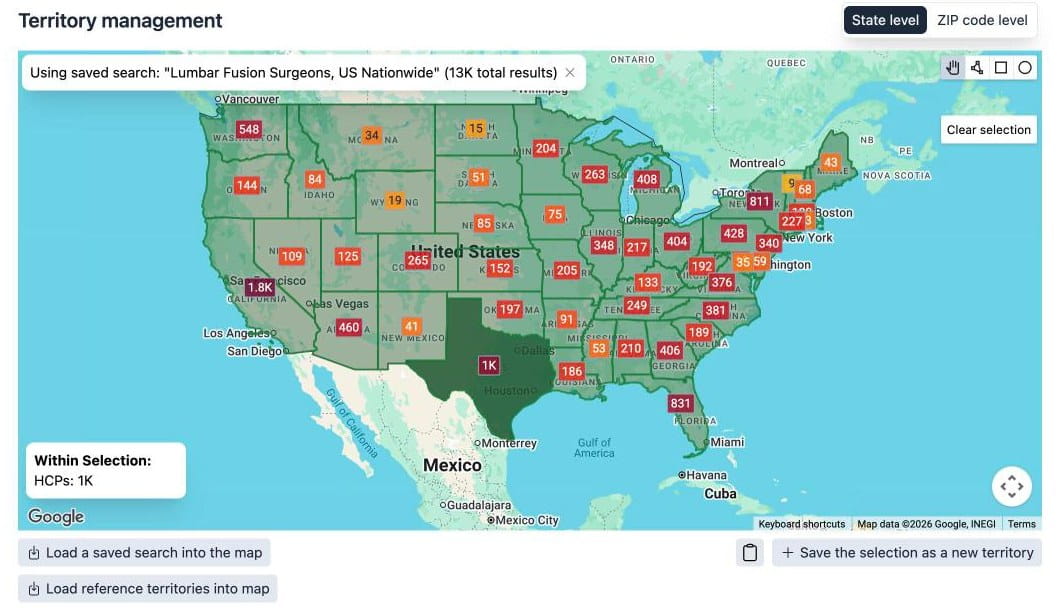
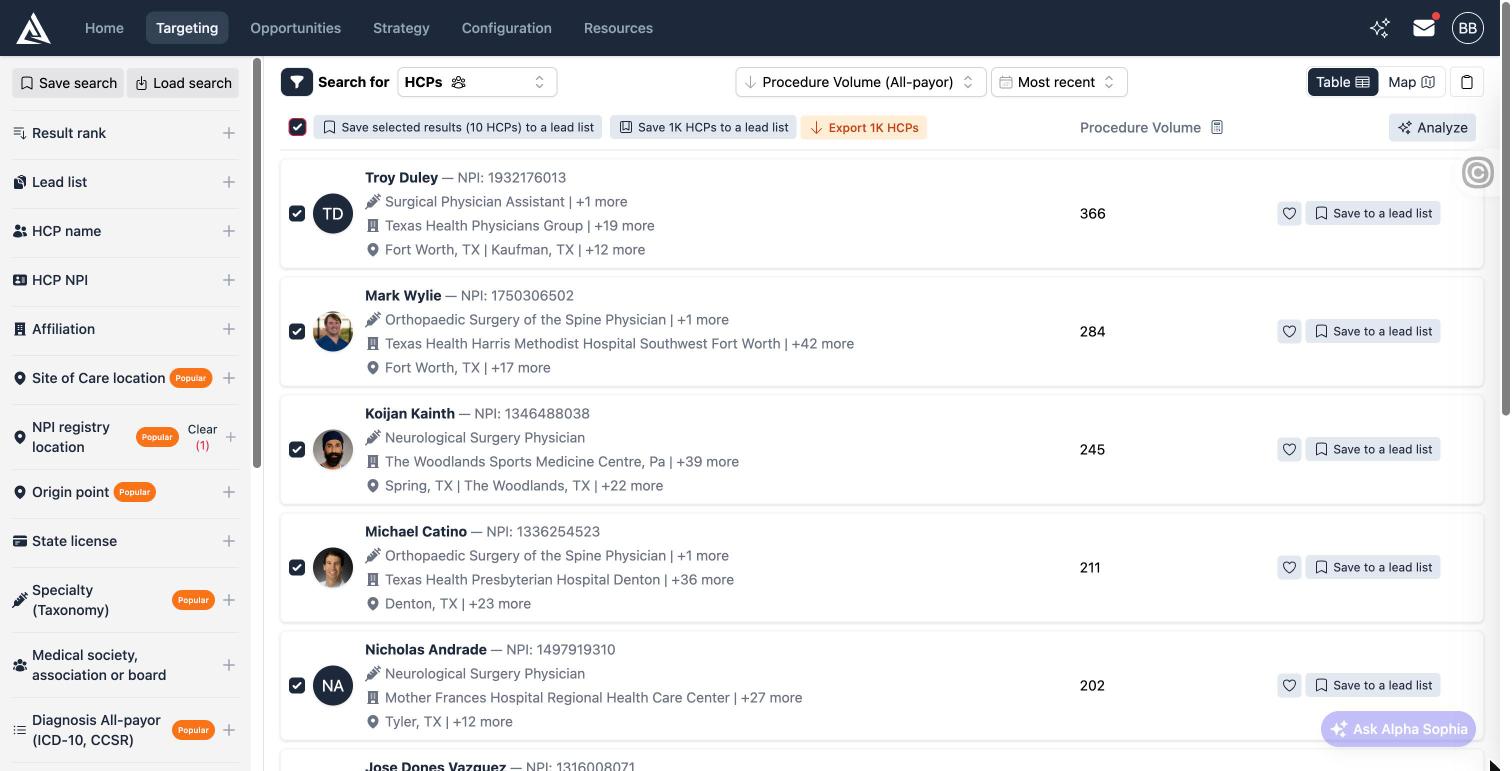
A map can split Texas into four equal territories. It can’t tell you which one holds the spinal fusions. Alpha Sophia plans territories around where your target procedures happen, using all-payer claims data on 7.5M+ US providers, so you can balance workloads by real opportunity and give every new rep a ranked target list.
“One day after Alpha Sophia, my rep had referrals from an entirely new clinic, from a doctor that is one of the top prescribers in the state.”
Trusted by 100+ customers, including OSSTEC, Medical Metrics Diagnostics, Ossiform, Hayek Medical, and ChestPal.
General territory and mapping tools, such as Maptitude, eSpatial, and Badger Maps, work from data you bring: a customer list, a CRM export, or sales history. That’s enough when your accounts are already known. A team entering a new state or adding reps usually starts with the opposite problem: it doesn’t yet know which surgeons perform the procedure, or how often.
Healthcare territory planning software adds that missing layer. Alpha Sophia shows which providers bill your CPT (Current Procedural Terminology) and HCPCS Level II (Healthcare Common Procedure Coding System) codes, how much volume each one has, and where they operate, before you draw a single boundary.
| Alpha Sophia | General mapping tool | |
|---|---|---|
| Where the data comes from | All-payer US claims on 7.5M+ providers, included | Your CRM, spreadsheets, or sales history |
| Find providers by procedure | Filter by CPT and HCPCS codes and rank by procedure volume | Only if you import that data yourself |
| Balance territories by | Procedure volume, provider count, and driving distance | Account counts, revenue, or travel time you supply |
| Route planning | Yes, with start and end points in Territory Manager | Yes, in field sales apps such as Badger Maps |
| Best for | Teams entering new markets or adding reps without sales history | Teams with an established account base and clean sales data |
If you already know every account and only need to draw and route, a general mapping tool may be enough. If you need to find the providers first, start with the procedure data.
Four steps take you from a procedure code to territories your reps can work. The step-by-step territory planning guide shows each screen.
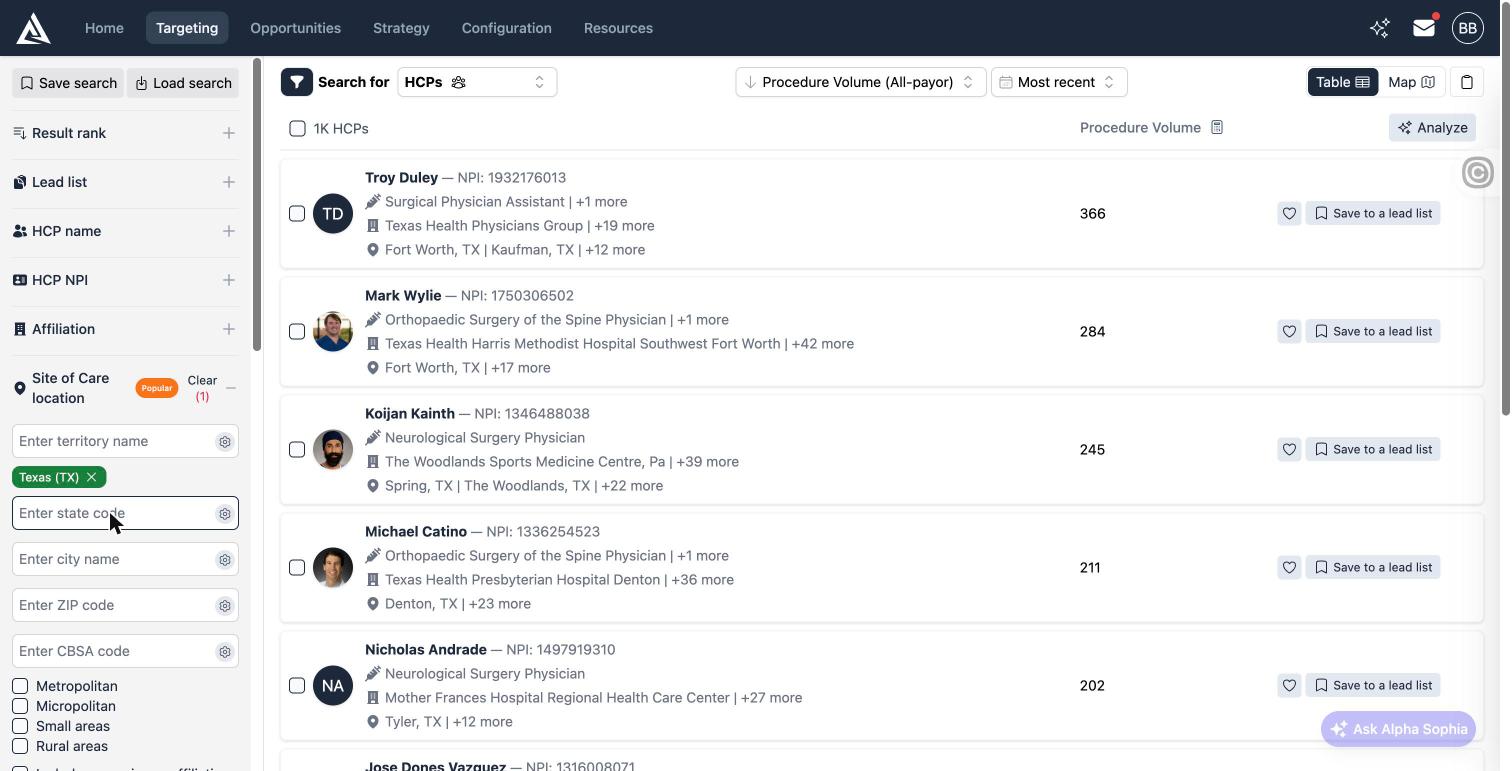
Pick the specialties that use your product, then add the CPT or HCPCS codes for the procedure. Rank the matching providers by all-payer procedure volume and save them as a named list, such as “Lumbar Fusion Surgeons, US Nationwide.”
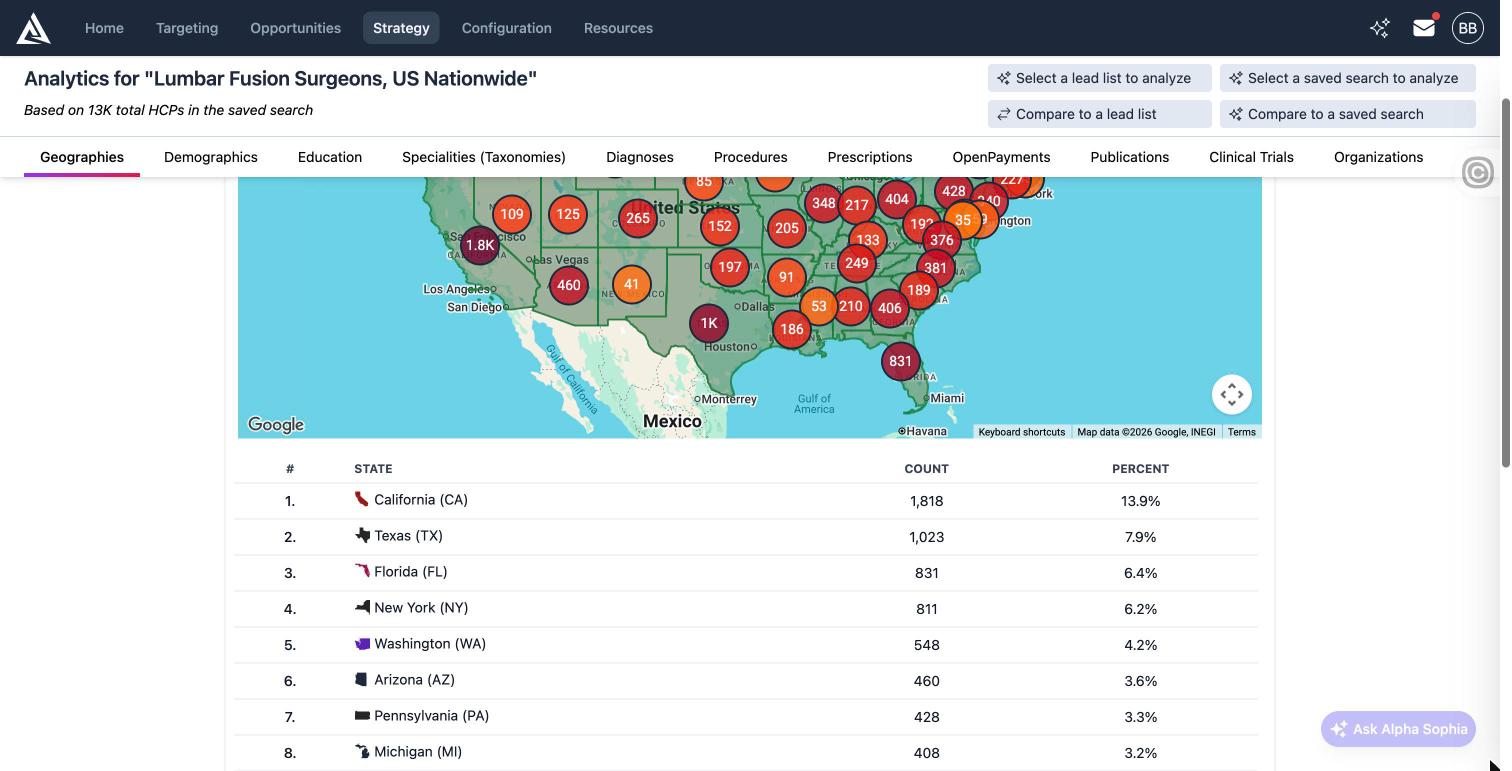
Open the list in the Analyze view to see your targets by state, with counts and percentages. You’ll know which states need coverage first before you hire or move anyone.
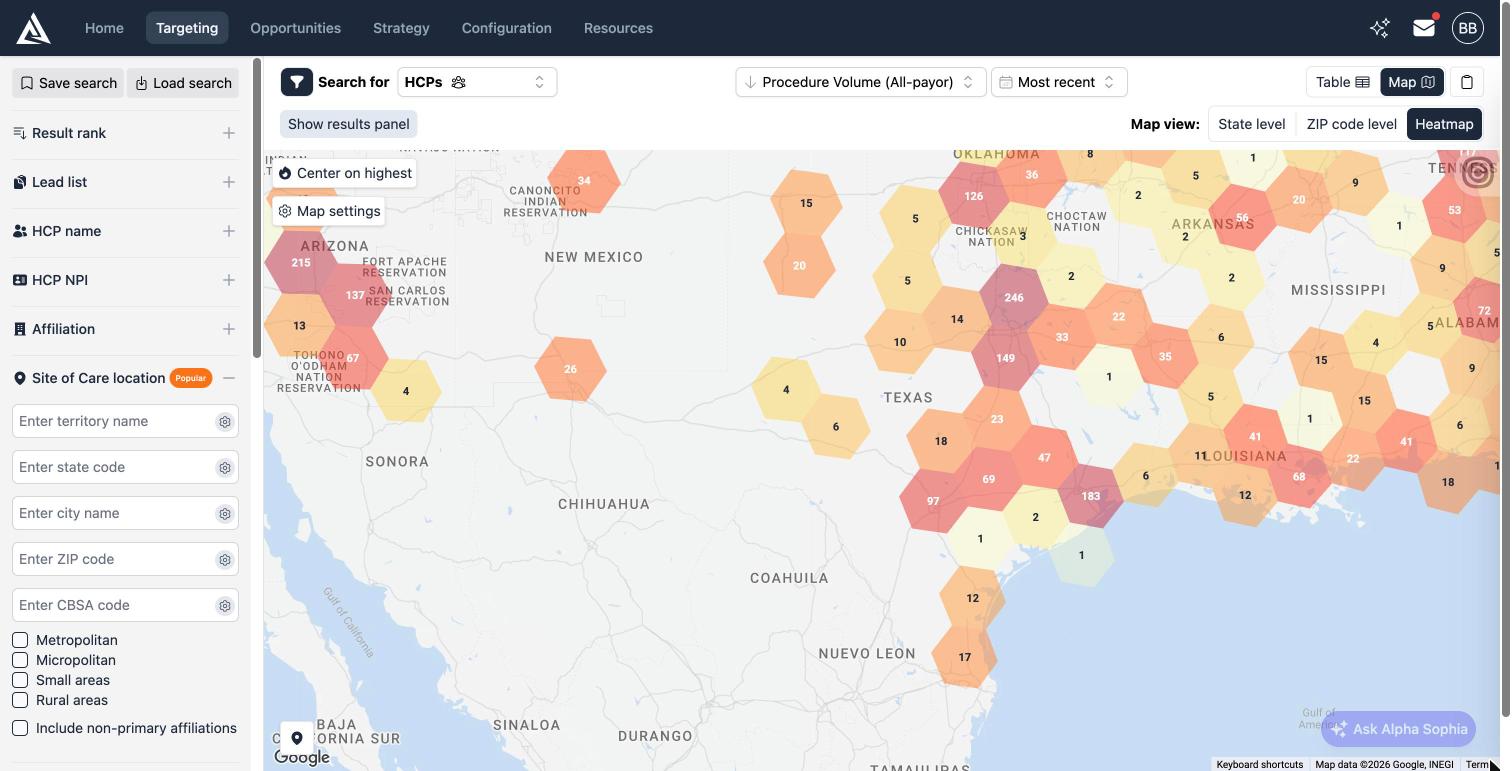
Switch to the ZIP-code map and use the polygon tool to draw around provider clusters, a metro area, or a natural barrier such as a river or mountain range. Save each one with a name like “Fort Worth TX, Jane Smith” and see how many providers it holds.
Export each territory’s targets to Excel or CSV, or send them to Salesforce or HubSpot through a custom CRM integration. In Territory Manager, reps set start and end points and plan driving routes between accounts.
Two territories with the same number of spine surgeons can look nothing alike once you count the spinal fusions those surgeons perform. Alpha Sophia lets you draw boundaries using all-payer CPT and HCPCS billing data, covering commercial, Medicare (including Medicare Advantage), and Medicaid claims, so each rep’s territory reflects the opportunity inside it rather than its size on a map.
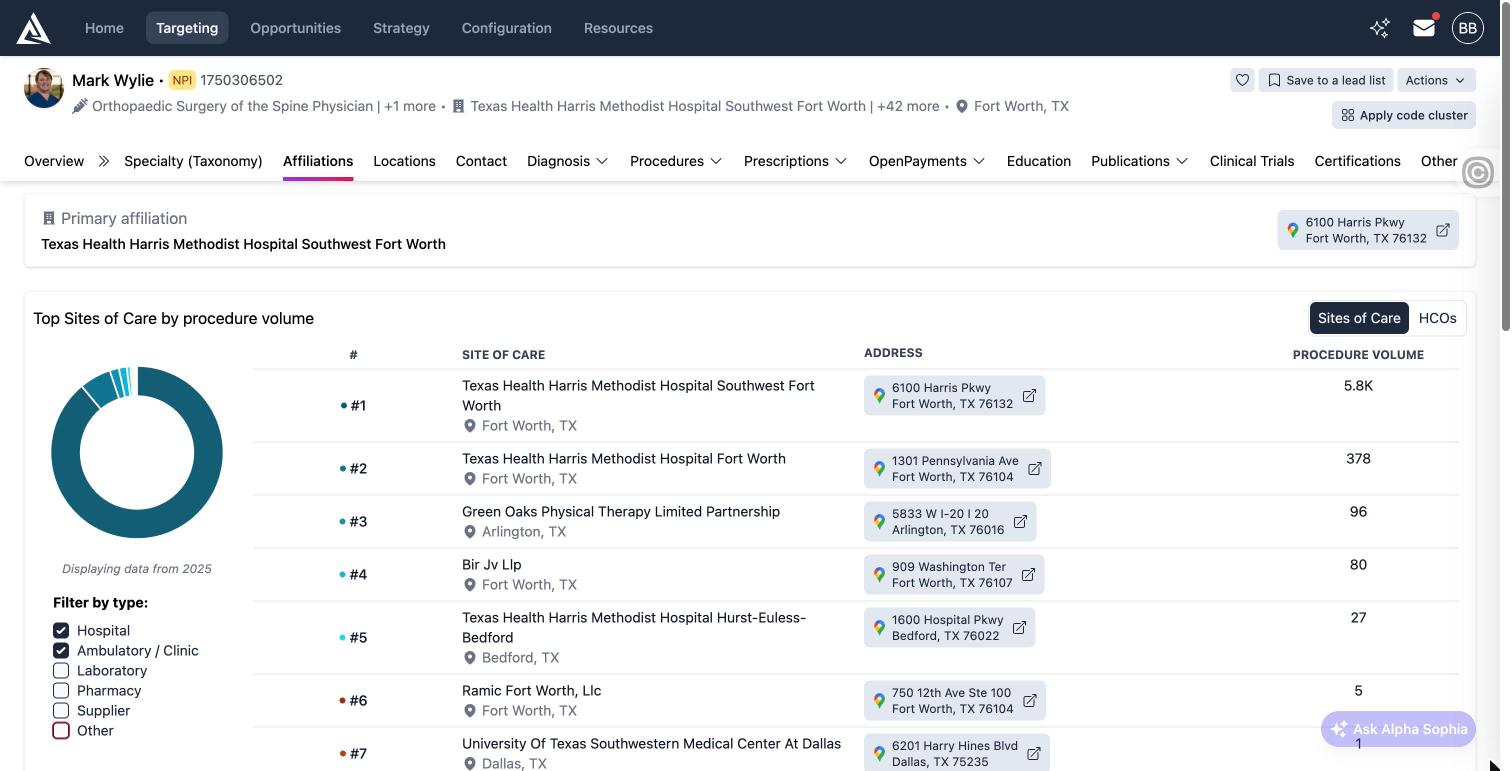
The Organizations view shows which hospitals, ambulatory surgery centers (ASCs), and clinics carry the most procedure volume among your targets. Open a surgeon’s provider profile to see every site of care and the recorded volume at each. A surgeon who does most cases at a large hospital may also operate at an ASC, where a meeting or product trial is often easier to arrange.
Turn any CPT or HCPCS code into a ZIP-code heatmap to see where the procedure is concentrated before you draw boundaries. Compare it with your current accounts to find nearby providers doing the same work who aren’t customers yet, and add referral intelligence to see which practices send them patients.
Equal account counts rarely mean equal work. One rep gets a handful of high-volume surgeons and hours on the highway, while the next gets dozens of low-volume clinics a few blocks apart. Every saved territory shows its provider count and its top targets by procedure volume, and Territory Manager measures driving distance in miles between providers. Profiles also show integrated delivery network (IDN) affiliations and independent sites of care, so you can weigh access, not just volume. Here’s why equal territory splits fall short in healthcare sales.
A launch or a new hire comes with no sales history to divide. When planning a launch with two reps, you can find the providers who perform the procedures your device supports, see where they cluster, and draw territories around the strongest clusters. Each new rep then starts with a ranked list of providers in their area, with profiles and battlecards, instead of spending the first weeks researching from scratch.
Connect Claude, ChatGPT, Cursor, or another MCP-compatible assistant to Alpha Sophia through our MCP server, and ask territory questions in plain English. Try “the 20 highest-volume knee replacement surgeons in Ohio” or “how many interventional cardiologists in Georgia perform TAVR,” and the answer comes back from Alpha Sophia’s claims data.
Prefer to stay in the platform? Alpha Sophia Assistant turns the same questions into filtered provider lists and shows the criteria it applied, so you can check them before you export.
Carve territories for new hires and rebalance them as the team grows.
Work a ranked list of high-volume providers and plan their daily routes.
Choose the first markets for a new device and size the coverage they need.
Use data-backed territory planning to focus regional coverage on treating physicians and KOLs.
Say a spine device company has two reps covering all of Texas and is hiring two more. The sales lead finds the surgeons billing the CPT codes for its spinal fusion devices and saves them as one list.
On the ZIP-code map, the lead sees where those surgeons cluster and draws four territories around the clusters, then checks each one’s provider count, top targets by volume, and driving distances, and moves boundaries until the opportunity and the windshield time even out.
Each territory’s ranked list goes into the team’s CRM. Both new hires start with a clear set of high-priority surgeons instead of a blank map.
Healthcare territory planning software helps commercial teams decide which providers, accounts, and areas each rep covers, using healthcare data such as procedure volume, sites of care, and affiliations rather than geography alone. Alpha Sophia builds territories from all-payer CPT and HCPCS claims, then lets you draw, balance, and route them in one place.
The three most common types are geographic, account-based, and hybrid, as the Alexander Group describes them. A geographic territory covers an area grouped by ZIP code, county, or state. An account-based territory is a list of named accounts, wherever they are. Field teams that visit accounts in person tend to use geographic or hybrid territories, because travel shapes so much of their week.
Balance on four things: procedure volume (the opportunity), the number of high-volume providers (the workload), driving distance, and access, such as whether surgeons sit inside a closed IDN or operate at independent ASCs. Equal account counts or equal ZIP codes ignore all four.
It depends on the data you already have. General mapping tools work well when you have accounts and sales history to load into them. For MedTech sales teams that need to find which providers perform a procedure, and how often, a healthcare platform like Alpha Sophia supplies that data alongside the map. See how we compare with AcuityMD and Definitive Healthcare .
Yes. Google’s free My Maps lets you draw lines and shapes on a map and import locations from a spreadsheet, which is enough to sketch basic territories. It doesn’t include procedure volumes, so you’d need to source that data separately and match it to your provider list.
You can export any territory’s targets to Excel or CSV, and direct CRM integration with Salesforce, HubSpot, and other tools is available as part of a custom setup. Ask about it on your demo.
Bring a procedure and a state to the demo. We’ll show you where the volume sits and how you could split it between your reps.